
Read KPI Review articles in order
After a review is created, the system automatically saves it in Draft status.
Draft is a preparation stage before the evaluation officially begins. During this stage, scoring is not yet enabled, and reviewers cannot submit KPI scores.
The Draft status is designed to allow Admins and Managers to review and prepare the evaluation structure in advance. All settings can be adjusted flexibly to ensure everything is ready before scoring starts.
While the review is in Draft, it is still considered a preparation phase.
Admins and Managers can freely edit the review structure without affecting any scoring data.
Once the evaluation setup is complete, the review status can be changed to In-Process to begin KPI scoring.
KPI
Used to add KPIs one by one by selecting from KPIs created by Admins.
Suitable when specific KPIs need to be assigned to an individual employee.
Template
Used to add KPIs from a predefined KPI Template.
The system will automatically apply the KPI set and weightage from the selected template.
Copy KPI
Used to copy KPIs configured for one employee and apply them to other employees within the same review round.
The copied KPIs will replace the existing KPIs of the target employee.
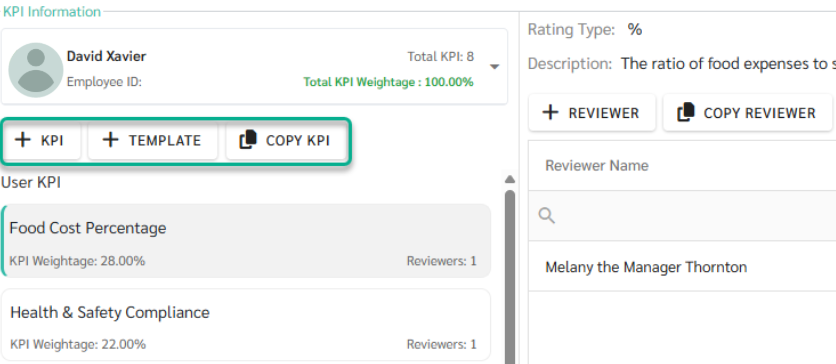
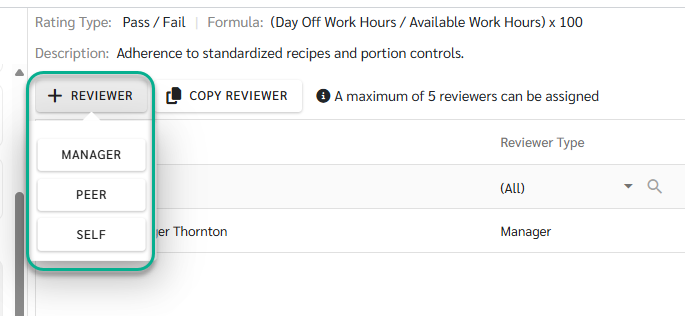
Each KPI can have multiple reviewers, and Reviewer Weightage can be configured differently for each reviewer. The system limits the number of reviewers to a maximum of 5 reviewers per KPI.
The system supports three reviewer roles:
Manager - Automatically assigned based on the employee’s Employee Detail configuration and acts as the primary reviewer
Peer - Can be selected only from employees within the same Branch
Self - Allows employees to perform self-evaluation
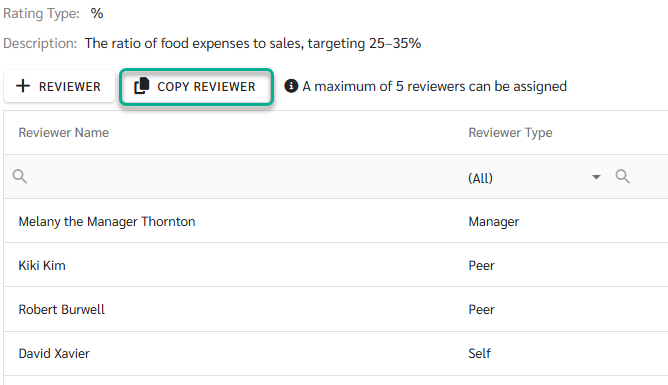
Copy Reviewer
The system will automatically copy the Reviewer and Reviewer Weightage from the source KPI and apply them to the target employee’s KPI. This helps reduce repetitive setup and ensures consistency in the review structure.
While the review is in Draft status:
Reviewers cannot submit scores
Score calculation does not begin
The review can be saved multiple times to allow further preparation and adjustment
The system allows saving even if the setup is not yet complete, for example:
KPIs have not been fully added
KPI weightage does not yet total 100%
Reviewers or reviewer weightage have not been fully configured
However, before changing the review status to In-Process, Admins or Managers should ensure that all of the following conditions are met:
KPIs are correct and complete
Required reviewers (Manager, Peer, Self) have been selected
KPI weightage equals 100%
Reviewer weightage is properly configured and totals 100%
Once everything is ready, Admins or Managers can change the review status to In-Process.
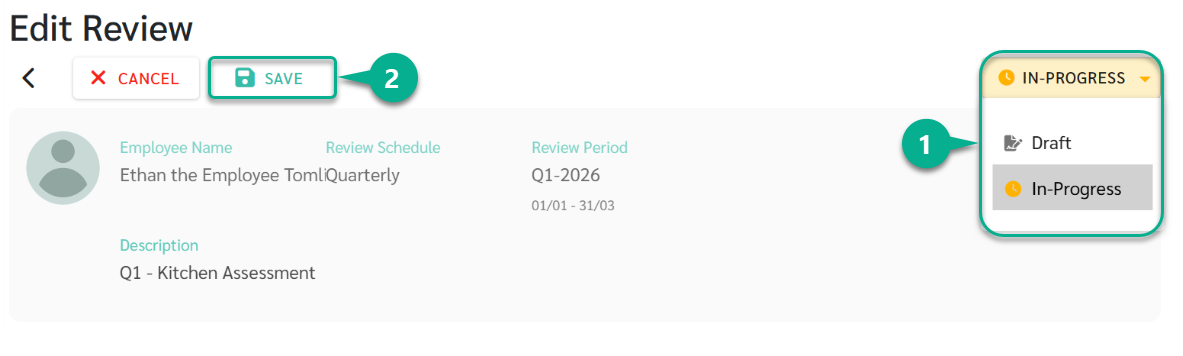
When the status changes to In-Process:
The KPI scoring process officially begins
The system sends email notifications to all assigned reviewers, inviting them to submit KPI scores according to their roles
After the review enters In-Process status:
Reviewers can start scoring KPIs
Core evaluation structures, such as KPIs and weightage, can no longer be freely edited as in Draft status
