How to view the Reports
Navigate to Reports -> Standard Reports -> Employee Reports -> Documents.
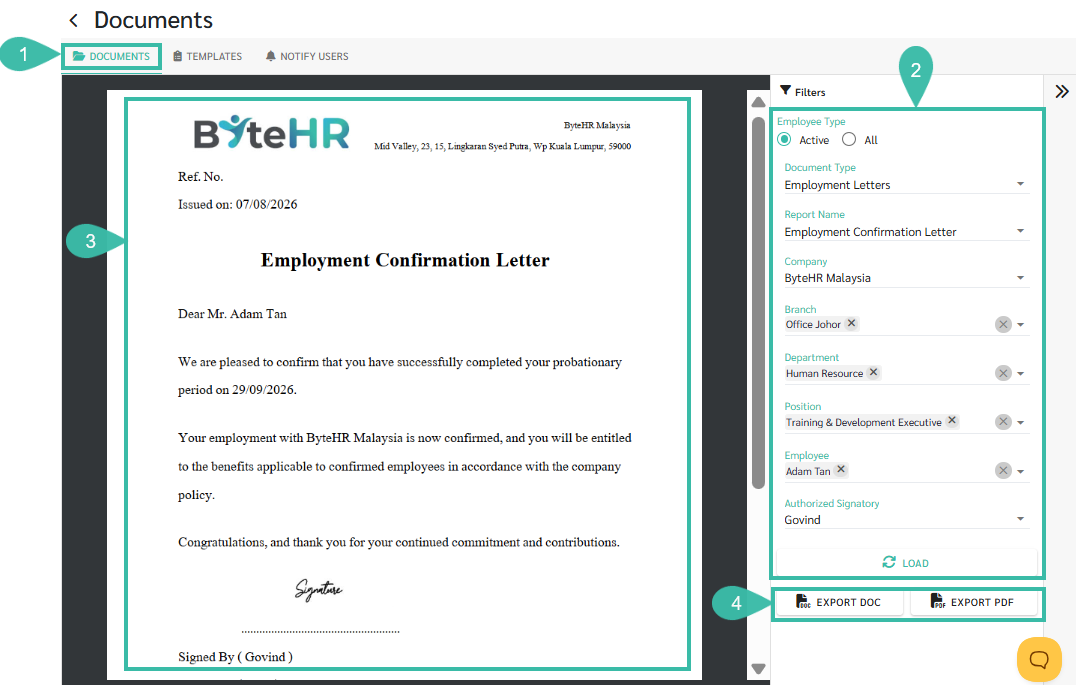
Configure the required filters::
Document Type: Select the document category.
Report Name: Select the document template you want to generate.
Company: Select the Company.
Branch: Select the Branch.
Department: Select the Department.
Position: Select the Position.
Employee: Select the employee for whom you want to generate the document.
Authorized Signatory: Select the person who will appear as the signatory on the document.
Click Load to generate and preview the document.
Review the generated document in the preview pane.
Click Export DOC to download the document in Microsoft Word format, or click Export PDF to download it as a PDF.