
Question: How does the system calculate late deduction for employees who went out early or return late from their break?
Answer: The system includes Shift Break configured in the Shift Schedule when calculating late/out early deductions if the deduction rule is configured to deduct late minutes.
Question: How the system determines Out early before break and late after break?
Answer: The system identifies timestamps based on the configured Shift Break.
To determine whether an employee went Out Early before break, the system checks:
The last clock-out before the break starts.
The timestamp must fall within 2 hours before the break start time.
To determine whether an employee returned Late after break, the system checks:
The first clock-in after the break end time.
The timestamp must fall within 2 hours after the break end time.
Example:
Shift Start Time | 08:00 AM |
Shift End Time | 17:00 PM |
Break Start Time | 12:00 PM |
Break End Time | 13:00 PM |
Actual Timestamps | 08:00 AM;10:30 AM; 14:00 PM; 15:00 PM; 17:00 PM |
Out Early before Break:
The system checks the last clock-out between 10:00 AM and 12:00 PM.
Last clock-out = 10:30 AM
Employee left 90 minutes before the scheduled break.
Out Early = 90 minutes
Late after Break:
The system checks the first clock-in between 13:00 PM and 15:00 PM.
First clock-in = 14:00 PM
Employee returned 60 minutes late.
Late After Break = 60 minutes
Question: Where can I view the daily report on Out Early Minutes or Late Minutes for Break Time?
Answer: You can view the Out Early Minutes (Break) and Late Minutes (Break) in the Attendance Details Report.
Go to Attendance Details Report.
Open the Column Chooser.

Select Out Early Minutes (Break) and Late Minutes (Break) under Attendance Details.
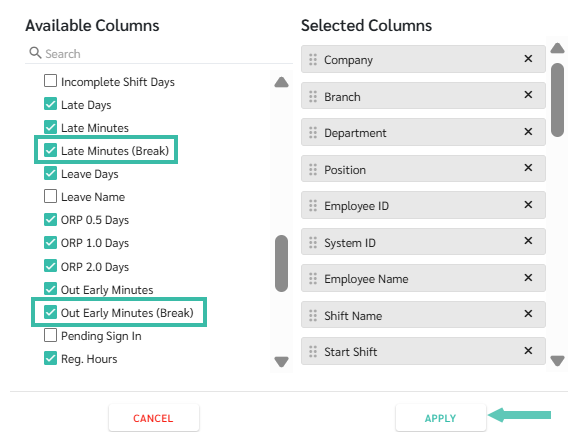
Drag both columns next to the Date of Work column for easier viewing.
You may filter by Employee Name to view the employee's daily Out Early Minutes (Break) and Late Minutes (Break).
The total Out Early Minutes (Break) and Late Minutes (Break) will be displayed at the bottom of each respective column.