
💬 Note
Payroll settings can be configured at both the Company and Branch levels.
Company-level payroll settings:
Used when the company has multiple branches, each using the same Tax Method, Payroll cycle, Overtime calculations, Allowance payments, and Deductions.
Branch-level payroll settings:
Used when each branch uses different Tax Methods/Rates, or has different Payroll, Overtime, Allowance, or Deduction cycles.
This allows companies to configure payroll settings to enable simultaneous payroll processing for multiple branches, including Payroll Approval, Payslip notification, and the Generation of Bank Files for multiple branches at the same time.
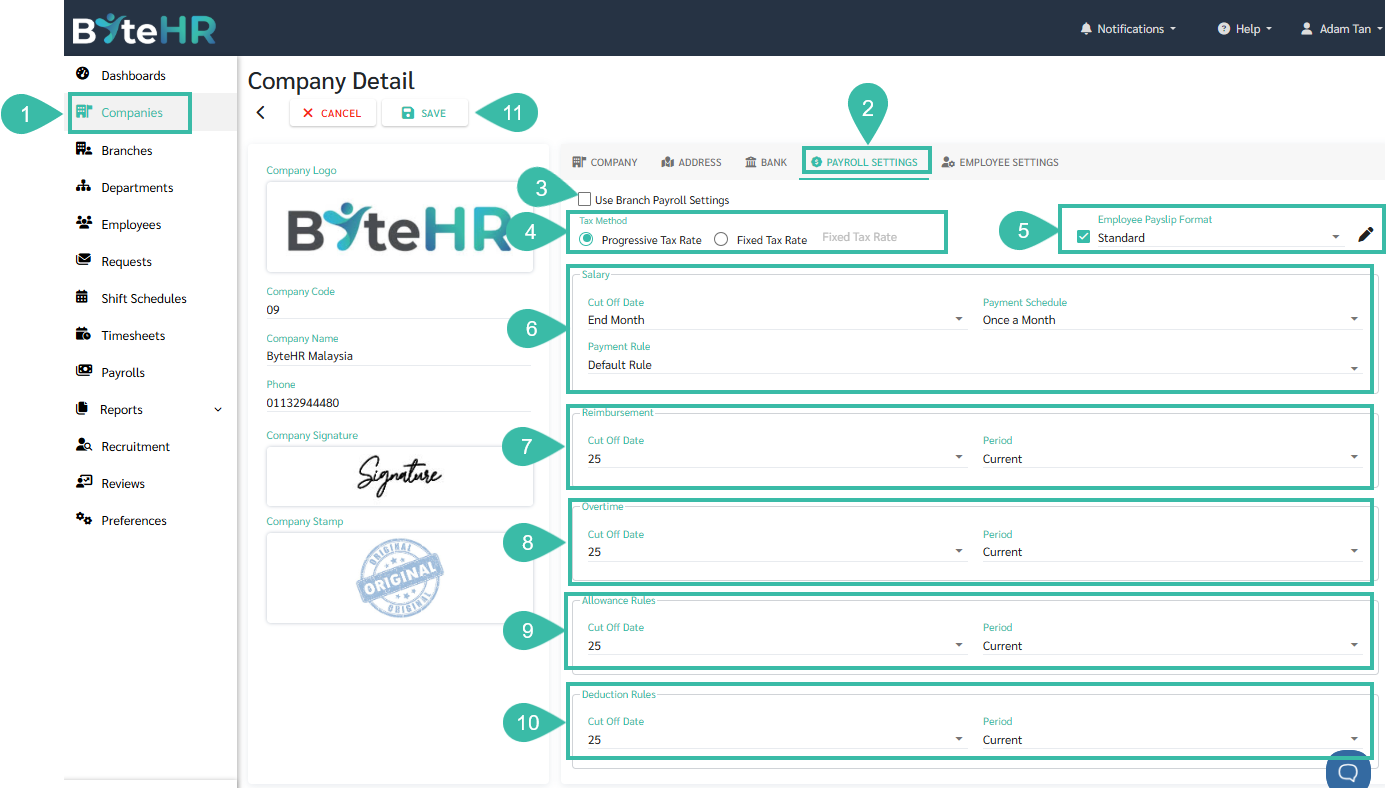
Go to the Company.
Click Payroll Settings.
Use Branch Payroll Settings:
If the Payroll settings is configured for the whole Company, uncheck the "Use Branch Payroll Setting" box.
Once the settings has been saved, the Payroll Settings page for all branches within the company will display the same payroll settings as those configured for the entire company and will no longer be editable.
To configure Payrolls for each branch separately, check the "Use Branch Payroll Setting" box and configure the Payroll Settings for each branch.
Click Save.
Tax Method:
Progressive Tax Rate
Fixed Tax Rate
Employee Payslip Format
This defines the format of payslips that employees can view via mobile app or web app.
Two Types of Payslip:
Standard
Format 1
Salary
You can set the Cut Off Date, Payment Schedule and Payment Rule.
Cut Off Date
For instance, if the Cut Off Date is configured as 25. Then, the Payroll cycle is from 26th of previous month to 25th of current month.
If the Cut Off Date is configured as End Month, then the payroll cycle is 1st -30th/31st.
Payment Schedule:
Once a Month
Twice a Month
Weekly
Payment Rule
To configure if employee type Daily and Hourly are paid on Public Holidays and Days Off.
Reimbursement.
If the Salary Payment Schedule is Once a Month, the Payments will be made monthly.
Cut Off Date
If the time period is the current period, it is not possible to set Reimbursement cut off date after the Salary cut off date.
Period
You can select the time period for payroll processing
Previous
Current
If the Salary Payment Schedule is Twice a Month.
The option of Payment Schedule can be set to
Once a Month
Twice a Month
Period
You can select time period for payroll processing
Previous
Current
However cannot select the cut-off date/end date of the first payroll cycle.
The cut-off date/end date for the first payroll period will be the same as the salary date.
If the Salary Payment Schedule is Weekly.
Period
You can select time period for payroll processing
Previous
Current
Cut Off Date
The same as Salary Cut Off Date.
Overtime
f the Salary Payment Schedule is Once a Month, the Payments will be made monthly.
Cut Off Date
If the time period is the current period, it is not possible to set Overtime cut off date after the Salary cut off date.
Period
You can select the time period for payroll processing
Previous
Current
If the Salary Payment Schedule is Twice a Month.
The option of Payment Schedule can be set to
Once a Month
Twice a Month
Period
You can select time period for payroll processing
Previous
Current
However cannot select the cut-off date/end date of the first payroll cycle.
The cut-off date/end date for the first payroll period will be the same as the salary date.
If the Salary Payment Schedule is Weekly.
Period
You can select time period for payroll processing
Previous
Current
Cut Off Date
The same as Salary Cut Off Date.
Allowance Rules
If the Salary Payment Schedule is Once a Month:
Cut Off Date
If the time period is the current period, it is not possible to set Allowance Rules cut off date after the Salary cut off date.
Period
You can select the time period for payroll processing
Previous
Current
If the Salary Payment Schedule is Twice a Month or Weekly:
Cut Off Date
The same as Salary Cut Off Date.
Period
You can select the time period for payroll processing
Previous
Current
Deduction Rules
If the Salary Payment Schedule is Once a Month:
Cut Off Date
If the time period is the current period, it is not possible to set Deduction Rules cut off date after the Salary cut off date.
Period
You can select the time period for payroll processing
Previous
Current
If the Salary Payment Schedule is Twice a Month or Weekly:
Cut Off Date
The same as Salary Cut Off Date.
Period
You can select the time period for payroll processing
Previous
Current
Click Save to save the changes made.
🏷️ Case
When setting up payroll within a company, all branches will have the same payroll settings, such as the payroll cut off date and payment period, Allowance payment cut off date and period, Deduction cut off date and period, etc.
